


Description
Download FLauncher APK – Android TV App Launcher, Free, Open-Source, Flutter-Based
Overview
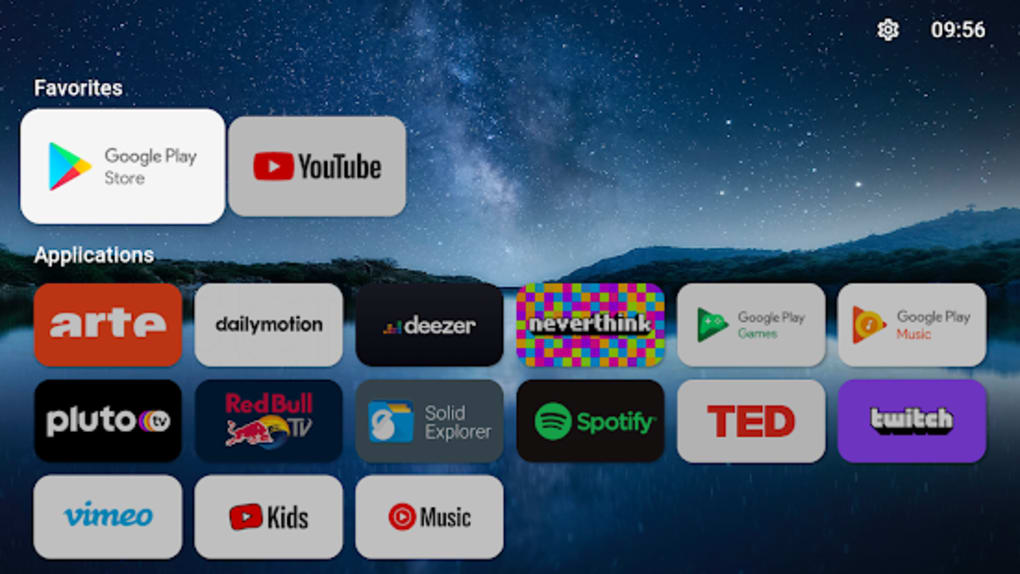
FLauncher is a free, open-source Android TV app launcher developed by Étienne Fesser. Built using Google’s Flutter framework, it serves as a cross-platform alternative to the default Android TV and Google TV launchers. Designed primarily for users seeking greater control over their smart TV interface, FLauncher enables the management and launching of sideloaded non-TV applications, expanding the device’s functionality beyond officially supported apps. The software is particularly useful for tech-savvy users who want to install and organize Android games, media players, and utility apps not available through official app stores. It aims to solve the limitations of stock launchers by offering a customizable, ad-free experience. While still in early development, FLauncher has demonstrated stable performance on compatible devices such as the Chromecast with Google TV. The developer did not provide additional system requirements or details on platform-specific compatibility beyond Android TV. Real-world usage includes personalizing the home screen layout, organizing apps into custom categories, and streamlining access to app settings and information. Its lightweight, modern design emphasizes usability and efficiency, making it ideal for users who value both aesthetics and functionality in their smart TV experience.Key Features & Capabilities
- Customizable Categories – Users can create and manage personalized app categories to organize sideloaded applications based on preference, improving accessibility and workflow.
- Flexible Display Options – Supports adjustable row and grid layouts, allowing users to tailor the home screen’s visual structure to their viewing habits and screen size.
- Wallpaper Support – Enables the use of custom wallpapers, enhancing the visual appeal and personalization of the launcher interface.
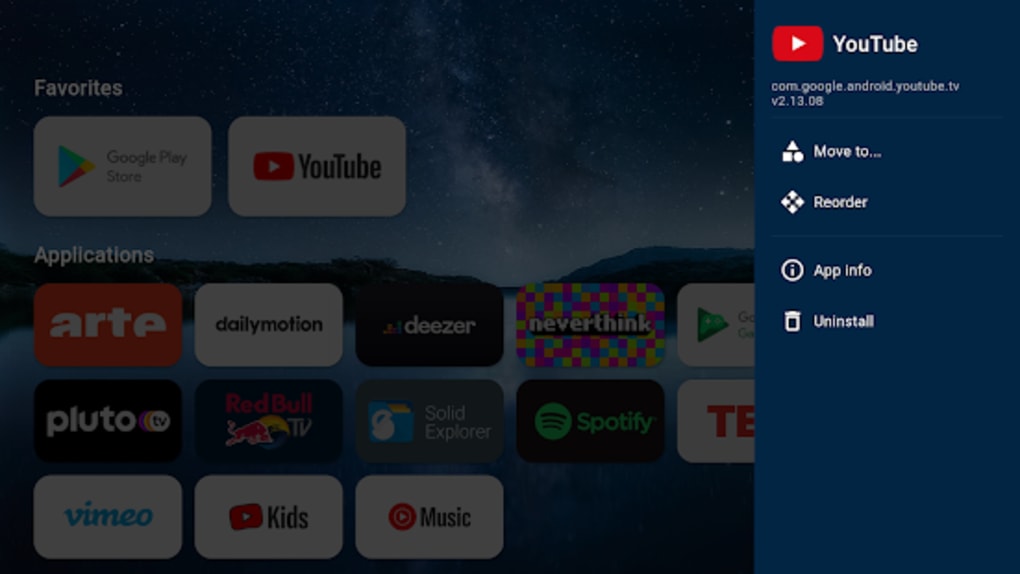
- App Reordering and Management – Apps can be manually rearranged within categories, providing full control over the launch order and layout.
- Quick Access to App Info – Includes direct shortcuts to Android settings and the 'App info' screen for any installed application, streamlining troubleshooting and configuration.
- Uninstall Functionality – Allows users to remove unwanted apps directly from the launcher interface without navigating through system settings.
- Ad-Free Experience – The software does not display advertisements, ensuring uninterrupted navigation and usage.
- Open-Source Transparency – The source code is publicly available, allowing developers and users to inspect, audit, and contribute to the project.
User Interface, Workflow & Performance
FLauncher features a clean, minimalistic user interface designed for intuitive navigation on large-screen devices. The layout is structured around a grid-based home screen with customizable rows and columns, allowing users to adjust the density of app icons based on their preferences. Navigation is streamlined through a logical hierarchy, with easy access to categories, app settings, and system tools. The workflow is optimized for remote control input, making it suitable for use with standard TV remotes. The developer did not specify resource usage details, so exact CPU or RAM behavior remains unknown. Performance observations are based on general software behavior patterns. Despite being in early development, the app has shown consistent operation on tested devices, including the Chromecast with Google TV. However, occasional instability may occur, as noted in the project documentation. The interface remains responsive during normal use, and transitions between screens are smooth. Stability may vary depending on device hardware and Android TV version. No performance benchmarks or real-time metrics were provided. Overall, the software appears optimized for low overhead and efficient operation.Compatibility & System Requirements
FLauncher is designed for Android TV devices and is compatible with systems running Android TV or Google TV. The app is distributed as an APK file, intended for sideloading. The installation size is not specified, and exact system requirements were not listed. The developer did not provide details on minimum hardware specifications, such as RAM or processor requirements. Compatibility information is limited to the target platform: Android TV. It has been tested on Chromecast with Google TV, suggesting support for devices using the latest Android TV 12 or higher. Users should ensure their device allows installation from unknown sources to use the app. The app’s reliance on the Flutter framework indicates cross-platform potential, but official support remains focused on Android TV. No information was provided regarding updates or automatic sync features.Pros and Cons
Pros
- Completely free and open-source
- Ad-free user experience
- Highly customizable interface and layout
- Supports sideloaded apps and third-party utilities
- Minimalistic and modern design
- Direct access to app settings and info
- Active development and community transparency
- Lightweight and efficient for smart TV use
Cons
- Still in early development stage
- Occasional instability reported
- No official support for non-Android TV platforms
- Requires manual setup to set as default launcher
- Limited documentation for new users
- Requires enabling unknown sources on the device
FAQ Section
Is FLauncher safe to download and use?
Yes, FLauncher is an open-source project, and its source code is publicly available for review. This transparency enhances trustworthiness. However, users should only install APKs from trusted sources and ensure their device allows apps from unknown sources.Can I use FLauncher on my regular Android phone or tablet?
FLauncher is specifically designed for Android TV devices and may not function properly on mobile platforms. The interface is optimized for remote control navigation and large-screen displays.How do I set FLauncher as my default launcher?
To set FLauncher as the default launcher, you must remap the Home button on your remote using a third-party tool like Button Mapper. This is required because the default Home button behavior cannot be overridden directly within the app.Does FLauncher support automatic updates?
The app does not include an automatic update mechanism. Users must manually download and install new versions from the official source or repository.Is FLauncher compatible with all Android TV devices?
While FLauncher has been tested on Chromecast with Google TV, compatibility with all Android TV devices is not guaranteed. Users should verify their device’s ability to install APKs and run third-party launchers.Final Thoughts + CTA
FLauncher stands out as a promising, free, and open-source alternative to the default Android TV launcher. Its clean design, robust customization options, and ad-free environment make it an ideal tool for users seeking greater control over their smart TV interface. Despite being in early development, it delivers core functionality with impressive stability on tested devices. It is particularly well-suited for tech-savvy users who enjoy sideloading apps and personalizing their home screen. The ability to manage non-TV apps, organize them into custom categories, and access settings quickly adds significant value. While minor instability may occur, the benefits far outweigh the drawbacks for power users. For anyone looking to enhance their Android TV or Google TV experience with a modern, customizable launcher, FLauncher is a compelling choice. Download FLauncher now.Guides & Tutorials for FLauncher APK
How to install FLauncher APK
- Click the Preview / Download button above.
- Once redirected, accept the terms and click Install.
- Wait for the FLauncher APK download to finish on your device.
How to use FLauncher APK
This software is primarily used for its core features described above. Open the app after installation to explore its capabilities.
User Reviews for FLauncher APK 0
No reviews found





